
HKPay - India's Trusted P2P Digital Trading Platform
HKPay is the easiest way to buy and sell digital assets. Trade securely with verified users and get instant money directly in your bank account via UPI. Fast, safe, and fully automatic.
⬇ HKpay APK Download Latest Version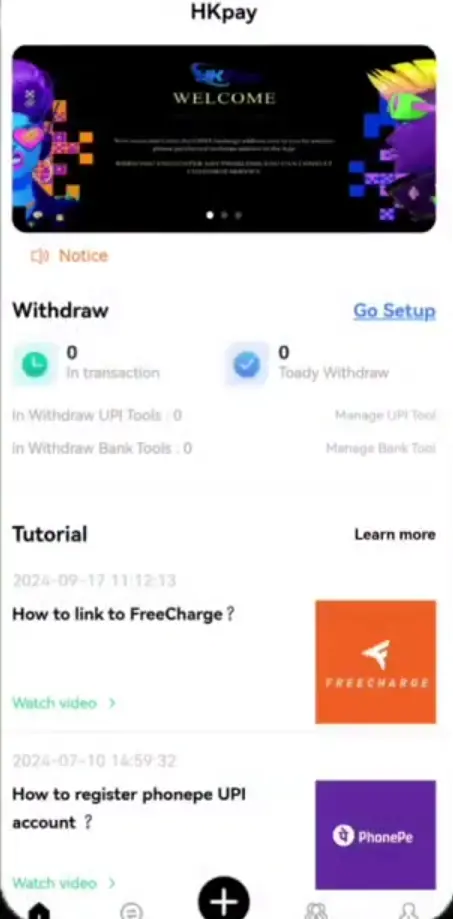
Guide Contents
What is HKPay?
Welcome to HKPay! The HKPay app is a direct trading platform (also called P2P) in India. Here, buyers and sellers trade with each other directly.
There is no middleman holding your money. When you sell your digital tokens, you get Indian Rupees (INR) straight into your bank account. There are no high fees and no long delays. It is simple and completely under your control.
HKpay Wallet

When you join, you get a free HKpay Wallet. This wallet keeps your digital tokens very safe.
- Real-time Balance: You can see your tokens at any time, day or night.
- Trade History: You can check all your past trades easily in one place.
- Full Control: We do not lock your tokens. You can sell them whenever you want.
HKpay Registration & HKpay Login
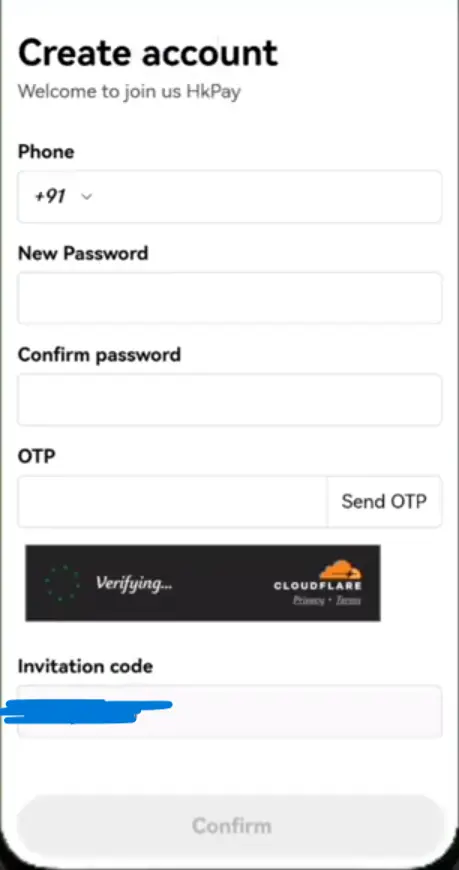
HKpay Registration (For New Users)
- Click the Register button at the top.
- Enter your mobile phone number.
- Create a strong password that you will remember.
- Enter the OTP sent to your phone to verify your account.
HKpay Login (For Existing Users)
- Click the Login button.
- Enter your registered mobile number and password.
- You are now inside your dashboard!
How to Buy Tokens
Buying tokens is very simple if you want to start trading.
- Go to the Buy section in the app.
- Choose how many tokens you want to buy.
- Send money to the seller's UPI ID using Google Pay, PhonePe, or Paytm.
- Click the "I have Paid" button. The seller will check their bank and send the tokens to your wallet.
How to Sell & Earn Money
Selling on HKPay is fully automatic. You don't have to confirm payments manually!
- Go to the Sell section in the app.
- Just click on the Start Selling button. You do not need to enter any amount!
- Automatic Selling: Our smart system will automatically start selling your available tokens to buyers.
- Money Received: The money is sent directly to your connected payment app (like PhonePe, Google Pay, or Paytm Business).
- Tokens Deducted: As soon as the money is received in your bank, the exact amount of tokens is automatically minimized (deducted) from your wallet.
| Trade Amount (₹) | Your Commission |
|---|---|
| ₹100 - ₹1,000 | 4.5% Standard |
| ₹1,001 - ₹5,000 | 4.8% Premium |
| ₹5,001 & Above | 5.0% VIP |
Invite Friends (Referral)
You can earn even more money without trading by inviting your friends!
- Find your special Invite Link in the app.
- Send this link to your friends on WhatsApp or Telegram.
- When your friend joins and completes a trade, you get a 2% bonus on their trade amount.
- You can invite as many friends as you want. There is no limit!

Supported Apps
We support all UPI apps in India. You can connect any of these apps to receive money automatically.
Safety & Security
We work hard to keep you safe from online scams. Please remember these rules:
Automated Safety
You don't need to worry about manual checking. Our automated system deducts tokens only when the money is successfully received in your connected UPI app.
Never Share Passwords
Do not share your OTP or UPI PIN with anyone, even if they say they are from HKPay.
Use Official Support
Only talk to our support team inside the official HKPay app. We will never call you to ask for your details.
Customer Support
Do you need help? We are here for you 24 hours a day.
- In-App Chat: Open the app and click on "Help". This is the fastest way to talk to our team.
- Warning: We do not have a customer care phone number. If someone calls you claiming to be HKPay, it is a scammer.
Pros and Cons
Pros (Good Things)
- Fully Automatic Selling: Place the order and relax. No manual confirmation needed!
- Very high commission (up to 5% per trade).
- Instant money directly into your bank account.
- Earn extra money by inviting friends.
Cons (Things to Remember)
- Since selling is fully automatic, you must make sure you connect the correct UPI ID.
- The app is only available as an APK file right now, not on the Google Play Store yet.
HKpay APK Download Latest Version
The HKpay app works best on your mobile phone. For the best experience, start your HKpay Download for Android today. Get our official app to trade easily anywhere you go.
- Click the HKpay APK Download Latest Version button at the top.
- Go to your phone Settings > Security, and turn on "Install from Unknown Sources".
- Open the completed HKpay Download file and click Install.
- Open the HKpay app, complete your HKpay login, and enjoy trading!
Questions & Answers
Is HKPay safe?
Yes. Our automated system ensures that tokens are only transferred to the buyer automatically after the money reaches your connected UPI bank account.
How do I withdraw my money?
There is no withdraw button. When you put tokens on sell, they sell automatically and the buyer sends money straight to your bank account instantly.
What if a buyer does not pay?
If the buyer does not pay in the given time, the trade cancels automatically. Your tokens stay safely in your wallet.
Is it free to join?
Yes, making an account is completely free. You only need money when you want to buy tokens.
Can I have two accounts?
No. Each person is only allowed to have one account. If you make two accounts, both will be blocked.